DVD Region X Circa 2002
Commercial DVD uses region code as a protection to prevent from playing on DVD players and DVD drives with different region codes. A European DVD in playback will encounter trouble in North America unless there is a region-free DVD player or DVD region killer software to circumvent all region codes.
In the early 2000's this was the official website for DVD Region X software which solved this issue for Britain, Australia, and Germany.
Jump to 2018 and there is now a vast market for this type of software which removes region codes, thus enabling the user to copy DVDs for a trouble-free playback.
Content is from the site's 2002 archived pages.
PROBLEM:
If a user of the Playstation 2 wants to play media from outside his 4-zone, he could do so only with an additionally inserted chip or a smart card. According to some legal experts, this is legal as long as no copies of games or films can be made.
But that's exactly the problem: Most of the "crack chips" available not only make it possible to play, but also to copy the protected products.
SOLUTION:
DVD Region X is the solution to this problem.
The package of software and dongle is available in a number of countries via Amazon. After installation, DVDs with any country code in PAL and NTSC format should be able to play without problems.
In general, region codes don't apply to recordable DVDs. A DVD that you make on a PC with a DVD burner or in a home DVD video recorder will play in all regions (but don't forget NTSC vs. PAL differences,. Region codes do not apply to DVD-Audio.
 bringing multi-region capability to your PS2™


As another service to DVD Region X customers, we have teamed up with top PlayStation and DVD website www.codejunkies.com to bring you all the latest DVD movie reviews and a guide to those 'Easter Egg' features hidden away in your DVD's !
ICYMI: It's true that nothing has impacted home entertainment quite like DVD. Although Blu-ray and Internet Streaming have taken a big bite out of DVD sales, there are still millions of discs in circulation being bought, sold, and viewed around the World. Even in 2018 wqe still have to contend with DVD Region Coding.
DVD regions are assigned as follows:
- REGION 1 -- USA, Canada
- REGION 2 -- Japan, Europe, South Africa, Middle East, Greenland
- REGION 3 -- S.Korea, Taiwan, Hong Kong, Parts of South East Asia
- REGION 4 -- Australia, New Zealand, Latin America (including Mexico)
- REGION 5 -- Eastern Europe, Russia, India, Africa
- REGION 6 -- China
- REGION 7 -- Reserved for Unspecified Special Use
- REGION 8 -- Reserved for Cruise Ships, Airlines, etc...
- REGION 0 or REGION ALL -- Discs are uncoded and can be played Worldwide, however, PAL discs must be played in a PAL-compatible unit and NTSC discs must be played in an NTSC-compatible unit.
Supposedly such coding is a tool to protect copyright and film distribution rights (in other words, movie studio profits). Movies are sometimes released in theaters in different parts of the world at different times throughout the year. What is a summer blockbuster in the U.S. may end up being the Christmas blockbuster overseas. When that occurs, the DVD version of the movie may be available in the U.S. while the movie is still showing in theaters in another region.
Movie companies do not want a friend in the U.S. to send a DVD copy of the film to the country where it is in theatrical release. Movie studio executive want to reap maximum profits from the theatrical releases. However, if you are a consumer wanting to see a movie that is available on DVD in your relative's or friend's country but not in yours, you may have to wait quite a while unless......you can purchase a Code Free DVD player, which is a modified version of stock DVD players in which the region coding function has been disabled or if you can "hack" your current DVD player using a series of remote control commands to enable it to play DVD from other regions. So even in 2018, the same issues addressed on this site in 2008 are still around. DO realize that Region Code hacking your DVD player or PC is perfectly legal - but it may void your warranty. And then there is also an additional hitch in the DVD Region Code madness. The analog video world is also divided into the NTSC and PAL video systems. Consumer may need a multi-system TV to access DVDs pressed in one of these systems. This is difficult in the U.S. market, where all analog video is based on the NTSC system where as most consumers in Europe and some other parts of the world own TVs that can view DVDs pressed in either NTSC or PAL. It's enough to make you crazy. With the increase in communication and travel, information and entertainment is able to be accessed just about anywhere at any time.
I speak from experience. Because our company works entirely online, we decided to work from Paris for several months. We were promoting a very cool online merchant selling Batman t shirts and other apparel. I love this project because I am a true Batman fan and have been since I was a child. And speaking to my friends and their families, the Dark Knight is really a superstar of noble proportions. It's common to see Batman hoodies and sweatshirts on the streets of Paris. Everyone I know has at least one Batman t shirt and many have way more so working for this cool business is a great conversation starter. This awesome store sells a huge selection of Batman shirts from the historic comic book days to the latest sublimated prints, and more. We bought a bunch of Batman shirts for our trip - they become coveted gifts. We also took along our collection of DVDs, including our fav Batman movies and discovered all the issues mentioned above with the different standards on players and discs. We couldn't even play our own DVDs or the ones we bought locally - when we arrived in Europe, our DVD player sold in the U.S. would not play any European DVD's. Discovering the solution to the problem...buying a Code-Free DVD player. Of course then we encountered another issue with our US made DVD's. Apparently, "Hollywood" has instituted another layer of coding on select region 1 DVDs called RCE (Regional Coding Enhancement). This prevents select region 1 DVDs from playing on Code-Free DVD players. So some of our US DVD's would play on the Code-Free DVD player and some wouldn't. Perhaps the movie studios and their profits would be better served by releasing films and videos at the same time everywhere. Not only would consumers be better served, but the cost of region coding and the need for after-market Code-Free DVD players would become less desirable. Problem solved, Batman movies now playable and we sit comfortably wearing our new Batman t shirts feeling confident that we solved one major transatlantic entertainment issue.
FAQ & Support
|
Incompatible DVD player Q. Problem message appears saying that the player version is not supported Colour Problems Q. The picture is in black & white when I try to play Region 1 disks A. You need to use an NTSC compatible TV Q. The image is still black & white, even though I have an NTSC compatible TV A. Ensure the TV has been set to NTSC mode (consult your manufacturers manual for details) Q. I STILL can't get a colour picture on my NTSC compatible TV A. Some TV's are only 60hertz PAL compatible, this is not the same as being NTSC compatible, and will not work with the PS2 DVD Player. |

|
Q. The picture is black & white when I connect my PS2™ to my TV through a SCART cable A. You need to be using a fully loaded SCART cable. The current cable is only made for composite output Q. The picture is green when being used with a fully loaded SCART cable A. We have now created codes to overcome this problem. Go to the Upgrade Codes section and find the codes for your version of Movie Player. Enter the Upgrade Codes (as detailed in Q-A (1) on this page). TV Type Problems Q. How do I change the TV TYPE in the dvd player? A. Leaving the dvd in the drive Stop the movie playing Press "SELECT" to enter the menu Enter the "SETUP" section Press "X" over the "TV TYPE", this will display a new menu Select new type. Q. My TV TYPE seems to be fixed and I can't change it? A. You need to make sure that the film is not playing when you enter the "SETUP" menu. Parental Lock Problems Q. How do I get passed the parental lock on my Japanese PS2 as I can't read the text? A. Once parental lock screen is displayed press "O" and a entry screen will be displayed. Pressing "O" another four times to enter "0000" will play the movie. Q. Can I make my PS2 always skip the parental lock screen? A. Press "SELECT" to enter the menu Move to the setup icon (briefcase) and press "O". Move to the padlock icon and press down twice. Press "O" five times. Press "Down" once. Press "O" and a list of numbers will be displayed. Press "UP" until you get to a japanese charater above the number eight. Press "O" to accept the new value. Press "Select" to come back out of the menu. |
|
|

|
||||||||||||||||||||||||||||||||||||||||||||||||||||||||||||||||||||||||||||||||||||||||||||||||||||||||||||||||||||||||||||||||||||||||
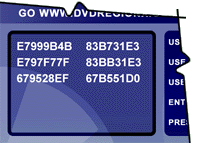 The codes below run left to right in pairs. When you enter them into your DVD Region X code entry screen you should enter them in this order.

Easter Eggs are hidden features put in DVD's by the studios to keep you entertained. Among the wonderous delights to be found lurking within your DVD's you are likely to find mobile ring tones, out-takes and hidden interviews.